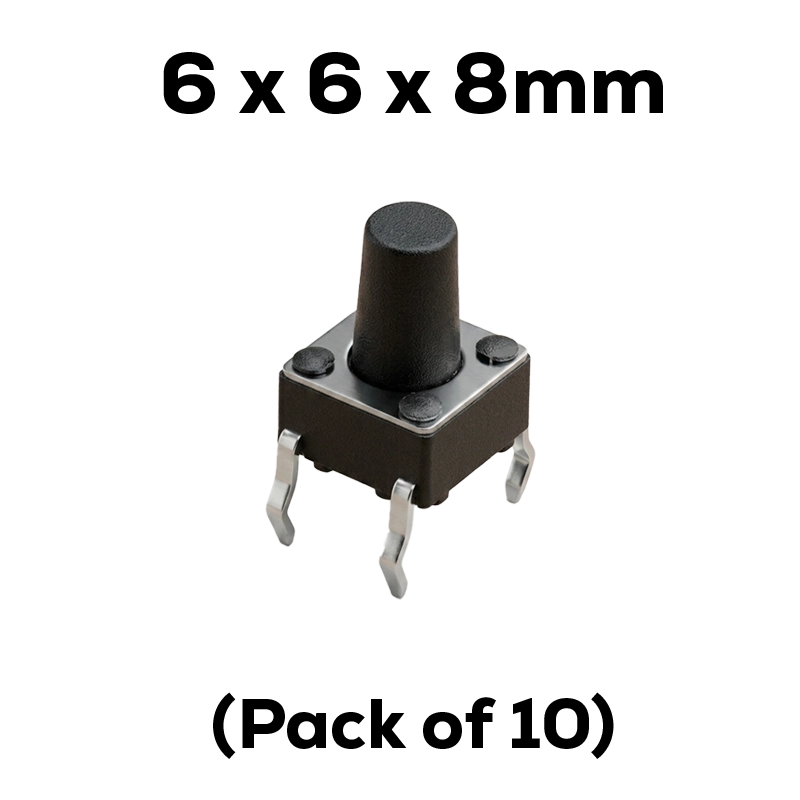

6 x 6 x 8mm Tactile Pushbutton – Black (Pack of 10)

SKU: TBF6-0010

The go-to tactile pushbutton switch for Indian makers and students — this 6×6×8mm, 4-pin, normally-open momentary switch fits standard breadboards perfectly and delivers crisp, consistent tactile feedback. Rated 50mA at 12V DC with a 300,000-cycle life. Pack of 10 — enough for a full semester of projects.

✅ 6×6×8mm through-hole, 4-pin — fits standard breadboards and PCBs
✅ Normally open (NO), momentary action — ideal for Arduino & ESP32 input
✅ 50mA / 12V DC rated — 300,000 cycle mechanical life
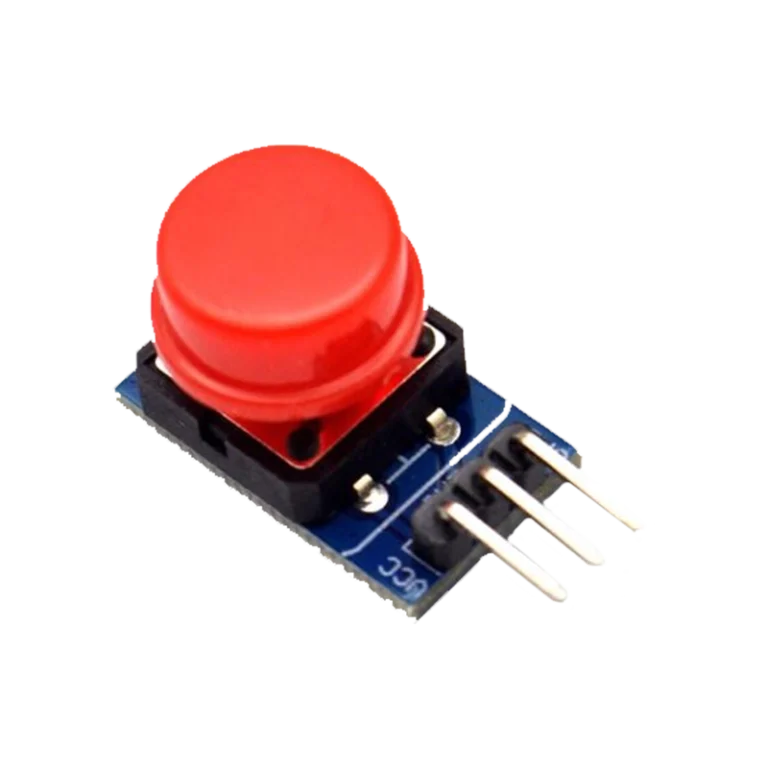
✅ Round actuator, crisp tactile click — consistent feel across the pack
✅ Best price in India — only at techiesms

Apple Shopping Event

Hurry and get discounts on all Apple devices up to 20%

Sale_coupon_15

20.00
(inc. GST)

18 in stock

18 in stock

12 People watching this product now!

Payment Methods:

Description

Tactile Pushbutton Switch 6×6×8mm — Pack of 10

Tactile pushbutton switch projects start right here — this 6×6×8mm, 4-pin, momentary through-hole switch is one of the most versatile and essential components in any maker’s toolkit. Whether you are a student putting together your first Arduino circuit, an experienced hobbyist building a complex IoT device, or a professional prototyping on a breadboard before committing to PCB design, this compact switch delivers crisp, reliable tactile feedback every single time you press it. Available in a convenient pack of 10, it offers exceptional value at the best price in India, right here at techiesms.


Technical Specifications

Parameter Value
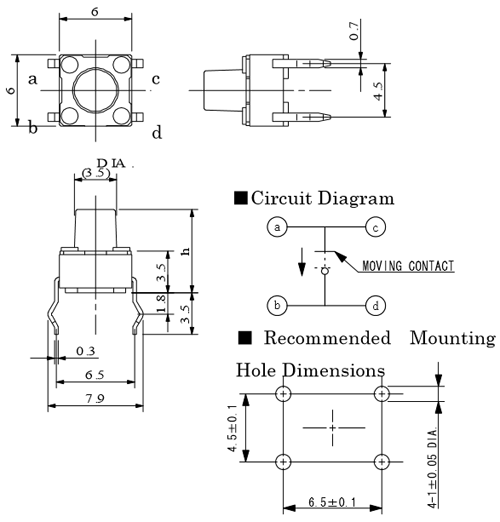
Dimensions 6mm × 6mm × 8mm (L × W × H)
Number of Pins 4 (through-hole, DIP)
Shaft Shape Round
Mounting Type Through-hole (PCB / breadboard)
Circuit Configuration Normally Open (NO), Momentary
Rated Voltage 12V DC max
Rated Current 50mA max
Contact Resistance Max 100mΩ
Insulation Resistance Min 100MΩ at 100V DC
Dielectric Withstanding Voltage 250V AC (1 minute)
Contact Bounce Max 5ms
Operating Temperature −20°C to +70°C
Storage Temperature −40°C to +85°C
Mechanical Life 300,000 cycles
Pin Pitch 4.5mm × 6.5mm
Pack Quantity 10 switches


What Makes It Stand Out

The 6×6×8mm form factor is the sweet spot for breadboard use. The 8mm shaft height gives your fingers a comfortable, positive press — not too stubby that it gets lost in a tight build, and not so tall that it wobbles on a PCB. The four pins are spaced at 4.5mm × 6.5mm to straddle the centre gap of a standard solderless breadboard cleanly, so you get a solid, rattle-free seating with zero fuss. The round actuator cap provides even pressure distribution, which is why this tactile pushbutton switch produces that satisfying, definitive click rather than a mushy, uncertain press.

Unlike slide switches or toggle switches, a momentary tactile switch like this one is normally open (NO) — the circuit is broken at rest and completes only while the button is pressed. The instant you release it, the circuit opens again. This makes it perfect for triggering events, reading user inputs, or waking a microcontroller from sleep, rather than holding a state.

The contacts are rated for up to 50mA at 12V DC and the mechanism is tested for a service life of 300,000 actuations — far more than enough for years of student projects, prototypes, and product iterations. This is the same class of tactile pushbutton switch found on professional development boards worldwide, including Arduino, ESP32 DevKit boards, and Raspberry Pi HATs.


Why Makers Choose This

The Indian maker community has a clear preference for components that work straight out of the packet with no configuration — and this switch does exactly that. Drop it into your breadboard, wire one side to your GPIO pin and the other to GND (then use INPUT_PULLUP mode in your code), and you are reading button presses in under a minute. There is no polarity to worry about, no special library required, and no fragile SMD pads to wrestle with.

Getting a pack of 10 means you are set for an entire semester of lab experiments. You can wire up multiple inputs, build game controllers with several buttons, or simply have spares on hand when a pin bends. For students preparing for college lab exams or making final-year projects, having a reliable quantity in stock is a practical advantage.

Professional makers will appreciate the consistent mechanical feel across the whole pack. Inconsistent actuation force between buttons can ruin the user experience of a handheld product — this batch maintains uniform tactile feedback thanks to the dome contact design.

For a detailed explanation of how to wire this tactile pushbutton switch with a pull-up or pull-down resistor on Arduino, the official Arduino Button tutorial is an excellent starting point. For pinout diagrams and circuit examples, Components101’s push button reference page is a reliable resource used by thousands of Indian students.


🔗 Important Links

🔗 Push Button Pinout & Datasheet Reference — Components101 — Full pinout diagram, circuit configurations, and specifications for standard 4-pin tactile switches

🔗 Arduino Official Button Tutorial — arduino.cc — Step-by-step guide to wiring and coding a pushbutton with Arduino using pull-down resistors


Best Used For

This tactile pushbutton switch is a staple component that shows up in nearly every electronics project. Here are five real use cases where this pack of 10 delivers immediate value.

Arduino & ESP32 input experiments are the most common application among Indian students. You can build simple LED toggle circuits, counter displays using 7-segment modules, or interrupt-driven programs using these switches wired to digital GPIO pins. With digitalRead() and INPUT_PULLUP, the code is beginner-friendly and the hardware setup takes minutes on a breadboard.

Menu navigation for OLED displays is a popular IoT project application. Three or four of these switches make up an up/down/select interface for navigating through sensor readings, Wi-Fi settings, or configuration menus on small OLED or LCD screens paired with ESP32 or STM32 boards.

Game controllers and quiz buzzers are a natural fit for a pack of 10. Students building competitive quiz systems for college fests can wire up multiple players’ buzzers using one microcontroller and several of these switches, each connected to a separate interrupt pin.

Reset and mode-select buttons on custom PCBs are one of the most practical uses. PCB designers routinely footprint a 6×6mm tactile switch for the hardware reset function or a boot mode toggle — exactly the same switch used on ESP32 DevKitC and Arduino Uno boards.

Debounce and interrupt-handling practice is a fundamental skill for any embedded developer. These switches produce a well-defined bounce (max 5ms per datasheet) that makes them ideal for practising software debounce routines, hardware RC debounce circuits, and external interrupt configurations in RTOS environments like FreeRTOS or Zephyr.


FAQ

Q1: Is this tactile pushbutton switch compatible with a standard solderless breadboard?
Yes. The 4 pins are pitched at 4.5mm × 6.5mm, which straddles the centre divider of a standard breadboard perfectly, giving you a stable, secure fit without bending any pins.

Q2: Do I need an external resistor with this switch?
Yes. This tactile pushbutton switch is a bare switch with no internal pull-up or pull-down. For Arduino/ESP32, the simplest approach is to enable the internal pull-up resistor in code (pinMode(pin, INPUT_PULLUP)) and wire the button between the GPIO pin and GND. Alternatively, use a 10KΩ resistor as an external pull-down.

Q3: What is the maximum voltage and current rating?
The switch is rated for 12V DC maximum at 50mA. This is well within the operating range of all 3.3V and 5V microcontroller GPIO systems.

Q4: Can I solder this tactile pushbutton switch directly to a PCB?
Absolutely. The through-hole design is intended for both breadboard prototyping and permanent PCB soldering. The pins are robust enough for repeated hand-soldering across student and professional projects.

Q5: Why buy a pack of 10 instead of single pieces?
Tactile pushbutton switches are consumed quickly across multiple projects. A pack of 10 means you always have spares, you can populate multiple inputs simultaneously, and the per-unit cost drops significantly — making it the most affordable and practical option for makers in India.


Related Products

Description

Tactile Pushbutton Switch 6×6×8mm — Pack of 10

Tactile pushbutton switch projects start right here — this 6×6×8mm, 4-pin, momentary through-hole switch is one of the most versatile and essential components in any maker’s toolkit. Whether you are a student putting together your first Arduino circuit, an experienced hobbyist building a complex IoT device, or a professional prototyping on a breadboard before committing to PCB design, this compact switch delivers crisp, reliable tactile feedback every single time you press it. Available in a convenient pack of 10, it offers exceptional value at the best price in India, right here at techiesms.


Technical Specifications

Parameter Value
Dimensions 6mm × 6mm × 8mm (L × W × H)
Number of Pins 4 (through-hole, DIP)
Shaft Shape Round
Mounting Type Through-hole (PCB / breadboard)
Circuit Configuration Normally Open (NO), Momentary
Rated Voltage 12V DC max
Rated Current 50mA max
Contact Resistance Max 100mΩ
Insulation Resistance Min 100MΩ at 100V DC
Dielectric Withstanding Voltage 250V AC (1 minute)
Contact Bounce Max 5ms
Operating Temperature −20°C to +70°C
Storage Temperature −40°C to +85°C
Mechanical Life 300,000 cycles
Pin Pitch 4.5mm × 6.5mm
Pack Quantity 10 switches


What Makes It Stand Out

The 6×6×8mm form factor is the sweet spot for breadboard use. The 8mm shaft height gives your fingers a comfortable, positive press — not too stubby that it gets lost in a tight build, and not so tall that it wobbles on a PCB. The four pins are spaced at 4.5mm × 6.5mm to straddle the centre gap of a standard solderless breadboard cleanly, so you get a solid, rattle-free seating with zero fuss. The round actuator cap provides even pressure distribution, which is why this tactile pushbutton switch produces that satisfying, definitive click rather than a mushy, uncertain press.

Unlike slide switches or toggle switches, a momentary tactile switch like this one is normally open (NO) — the circuit is broken at rest and completes only while the button is pressed. The instant you release it, the circuit opens again. This makes it perfect for triggering events, reading user inputs, or waking a microcontroller from sleep, rather than holding a state.

The contacts are rated for up to 50mA at 12V DC and the mechanism is tested for a service life of 300,000 actuations — far more than enough for years of student projects, prototypes, and product iterations. This is the same class of tactile pushbutton switch found on professional development boards worldwide, including Arduino, ESP32 DevKit boards, and Raspberry Pi HATs.


Why Makers Choose This

The Indian maker community has a clear preference for components that work straight out of the packet with no configuration — and this switch does exactly that. Drop it into your breadboard, wire one side to your GPIO pin and the other to GND (then use INPUT_PULLUP mode in your code), and you are reading button presses in under a minute. There is no polarity to worry about, no special library required, and no fragile SMD pads to wrestle with.

Getting a pack of 10 means you are set for an entire semester of lab experiments. You can wire up multiple inputs, build game controllers with several buttons, or simply have spares on hand when a pin bends. For students preparing for college lab exams or making final-year projects, having a reliable quantity in stock is a practical advantage.

Professional makers will appreciate the consistent mechanical feel across the whole pack. Inconsistent actuation force between buttons can ruin the user experience of a handheld product — this batch maintains uniform tactile feedback thanks to the dome contact design.

For a detailed explanation of how to wire this tactile pushbutton switch with a pull-up or pull-down resistor on Arduino, the official Arduino Button tutorial is an excellent starting point. For pinout diagrams and circuit examples, Components101’s push button reference page is a reliable resource used by thousands of Indian students.


🔗 Important Links

🔗 Push Button Pinout & Datasheet Reference — Components101 — Full pinout diagram, circuit configurations, and specifications for standard 4-pin tactile switches

🔗 Arduino Official Button Tutorial — arduino.cc — Step-by-step guide to wiring and coding a pushbutton with Arduino using pull-down resistors


Best Used For

This tactile pushbutton switch is a staple component that shows up in nearly every electronics project. Here are five real use cases where this pack of 10 delivers immediate value.

Arduino & ESP32 input experiments are the most common application among Indian students. You can build simple LED toggle circuits, counter displays using 7-segment modules, or interrupt-driven programs using these switches wired to digital GPIO pins. With digitalRead() and INPUT_PULLUP, the code is beginner-friendly and the hardware setup takes minutes on a breadboard.

Menu navigation for OLED displays is a popular IoT project application. Three or four of these switches make up an up/down/select interface for navigating through sensor readings, Wi-Fi settings, or configuration menus on small OLED or LCD screens paired with ESP32 or STM32 boards.

Game controllers and quiz buzzers are a natural fit for a pack of 10. Students building competitive quiz systems for college fests can wire up multiple players’ buzzers using one microcontroller and several of these switches, each connected to a separate interrupt pin.

Reset and mode-select buttons on custom PCBs are one of the most practical uses. PCB designers routinely footprint a 6×6mm tactile switch for the hardware reset function or a boot mode toggle — exactly the same switch used on ESP32 DevKitC and Arduino Uno boards.

Debounce and interrupt-handling practice is a fundamental skill for any embedded developer. These switches produce a well-defined bounce (max 5ms per datasheet) that makes them ideal for practising software debounce routines, hardware RC debounce circuits, and external interrupt configurations in RTOS environments like FreeRTOS or Zephyr.


FAQ

Q1: Is this tactile pushbutton switch compatible with a standard solderless breadboard?
Yes. The 4 pins are pitched at 4.5mm × 6.5mm, which straddles the centre divider of a standard breadboard perfectly, giving you a stable, secure fit without bending any pins.

Q2: Do I need an external resistor with this switch?
Yes. This tactile pushbutton switch is a bare switch with no internal pull-up or pull-down. For Arduino/ESP32, the simplest approach is to enable the internal pull-up resistor in code (pinMode(pin, INPUT_PULLUP)) and wire the button between the GPIO pin and GND. Alternatively, use a 10KΩ resistor as an external pull-down.

Q3: What is the maximum voltage and current rating?
The switch is rated for 12V DC maximum at 50mA. This is well within the operating range of all 3.3V and 5V microcontroller GPIO systems.

Q4: Can I solder this tactile pushbutton switch directly to a PCB?
Absolutely. The through-hole design is intended for both breadboard prototyping and permanent PCB soldering. The pins are robust enough for repeated hand-soldering across student and professional projects.

Q5: Why buy a pack of 10 instead of single pieces?
Tactile pushbutton switches are consumed quickly across multiple projects. A pack of 10 means you always have spares, you can populate multiple inputs simultaneously, and the per-unit cost drops significantly — making it the most affordable and practical option for makers in India.


Related Products

Specification

Overview

Processor

Display

RAM

Storage

Video Card

Connectivity

Features

Battery

General

Customer Reviews

0 reviews
0
0
0
0
0

There are no reviews yet.

Be the first to review “6 x 6 x 8mm Tactile Pushbutton – Black (Pack of 10)”